


Turtle Beach VelocityOne Flight
Turtle Beach is a leading manufacturer of flight simulation hardware and accessories, with the VelocityOne range designed to create a complete and immersive flying experience on Xbox Series X|S and Windows PC. Its products combine precise control, practical functionality, and accessible setup, making them suitable for both new flight simmers and experienced virtual pilots. High-performance sensors, configurable controls, and ergonomic designs help you fly with accuracy and keep important aircraft functions within easy reach.
The VelocityOne range is developed with close attention to what the flight simulation community needs from its hardware. This focus on functionality has resulted in a broad ecosystem of yokes, flightsticks, throttles, and rudder pedals that can be combined into a complete set of flight controls. With the right VelocityOne setup, you can control all primary flight axes — ailerons, elevator, rudder, and throttle — using dedicated hardware instead of relying on a keyboard or controller.
Whether you want to fly in a commercial aircraft, military jet, or private jet, Turtle Beach has the perfect hardware to make your next flight even more realistic.

VelocityOne Flight System
Developed by aviation engineers and pilots, the Turtle Beach VelocityOne Flight System is one of the most complete yoke solutions for flight simulation. The integrated 180° yoke provides smooth and precise pitch and roll control, while built-in rudder controls let you control the aircraft on the ground and in the air without separate rudder pedals. The modular throttle quadrant adds dedicated levers for throttle, propeller, mixture, flaps, and other aircraft functions, while the integrated Flight Management Display gives you direct access to settings and real-time flight information.
The many programmable buttons, switches, and interchangeable status indicators keep important cockpit functions within easy reach and let you configure the system around the aircraft you fly. A non-contact Hall-effect sensor on the main yoke axis provides precise control input without mechanical wear on the sensor itself, helping you to maintain precision over long-term use. Together with the integrated throttle quadrant and rudder controls, this gives you dedicated control over the primary flight axes — ailerons, elevator, rudder, and throttle — all from a single system.
As an all-in-one solution, the VelocityOne Flight System suits both new and experienced flight simmers who want a complete setup without combining several separate controllers. It is our most complete yoke system and our best-selling yoke for Xbox, combining extensive functionality with straightforward setup on Xbox Series X|S and Windows PC.

Everything you need to explore the skies in Microsoft Flight Simulator
The Turtle Beach V1 Flight System has any function you need to explore the virtual skies in Microsoft Flight Simulator on Xbox Series X|S and Windows PC.
- All-in-one flight controller
- Convenient throttle system, suitable for small- and large aircraft
- Integrated rudder control
- Fully compatible with Microsoft Flight Simulator 2020 / 2024 on PC and Xbox
- Your Flight Simulator Specialist since 2013
- Personal Advice from our Flight Sim Experts
- Rated 4.8 stars on average by 2000+ customers

VelocityOne Rudder Pedals
Take the realism of your flight simulation to the next level with the Turtle Beach VelocityOne Rudder Pedals. Designed to provide precise and natural rudder control, the pedals let you accurately control yaw during taxi, takeoff, and landing.
Adjustable pedal width and interchangeable pedal sets allow you to adapt the setup to your seating position and preferred aircraft type, while integrated differential brakes give you independent braking control for more realistic ground handling. Ultra-smooth, contactless Hall-effect sensors provide accurate input without physical sensor wear, helping maintain consistent performance over time. Multiple mounting options and a stable base help keep the pedals securely in position, whether you use them on the floor or as part of a dedicated simulator cockpit.
With extensive adjustability, precise control, and dedicated rudder and brake axes, the VelocityOne Rudder Pedals are the perfect addition to a complete flight simulation setup.
- Fully adjustable: from width to pedal angle to sliding resistance
- Works out of the box: no driver- or plugin-installation required
- Compatible with MSFS (2020/2024) on Windows PC and Xbox Series X|S
(requires connection through supported VelocityOne Flight Controller on Xbox)
Flight Sticks and Specs
Discover the Turtle Beach VelocityOne Flight Stick range and compare the different options for flight and space simulation. From compact all-in-one controls to complete HOTAS setups, each VelocityOne Flight Stick is designed to provide precise and intuitive control. Compare the key specifications to find the model that best fits your simulator, aircraft, and setup.
-

VelocityOne Flight Stick
The VelocityOne Flightstick is a versatile all-in-one controller for flight and space simulation, ideal for compact setups.
Sensors: hall-effect
Programmable Controls: 27 inputs
Adjustable resistance: no
Haptic feedback: no
Compatible with: Windows PC and Xbox -

VelocityOne Flight Stick II
The VelocityOne Flightstick II is an improved version of the original with a more refined and immersive control experience.
Sensors: 16-bit hall-effect
Programmable Controls: 38 inputs
Adjustable resistance: yes (3 presets)
Haptic feedback: yes
Compatible with: Windows PC and Xbox -

VelocityOne H.O.T.A.S.
The VelocityOne H.O.T.A.S. combines dedicated stick and throttle control in one complete setup for a more natural and immersive experience.
Sensors: 16-bit hall-effect*
Programmable Controls: 73 inputs
Adjustable resistance: yes
Haptic feedback: yes (on stick)
Compatible with: Windows PC and Xbox* 16-bit on stick, 10-bit on throttle
-

VelocityOne Flight Deck
The VelocityOne Flightdeck is Turtle Beach’s premium HOTAS solution, with dual displays and a unique Flight Touch Display.
Sensors: hall-effect*
Programmable Controls: 139 inputs
Adjustable resistance: no
Haptic feedback: yes (on throttle)
Compatible with: Windows PC* hall-effect sensors on stick and throttle


VelocityOne Universal Sim Mount
The Turtle Beach VelocityOne Universal Sim Mount provides a solid and adjustable mounting platform for flight simulation controls without requiring a dedicated cockpit. Built from rugged 4.8 mm (3/16-inch) steel, the 2.45 kg mount is designed to minimize flex and keep your controls stable during use. The package includes a mounting plate, height extender, desk clamp, integrated mousepad, two extension brackets, rubber feet, mounting hardware, and a hex tool, giving you everything needed to configure the mount for your desk or compatible aluminium extrusion rig.
The Universal Sim Mount is designed for the Turtle Beach VelocityOne ecosystem, but its mounting options also support a wide range of third-party flight simulation hardware.
Compatible brands include Logitech, MOZA, Thrustmaster, VIRPIL VPC, Virtual Fly, VKB, and WINCTRL (former WINWING), allowing you to combine controls from different manufacturers within the same setup. This makes the mount suitable for anything from a compact desktop flight setup to a more extensive simulator cockpit.
-
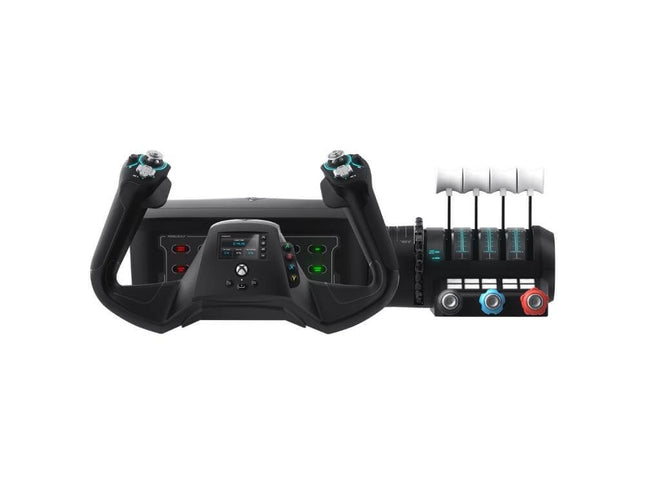
Turtle Beach VelocityOne Flight System
€ 254,52
-
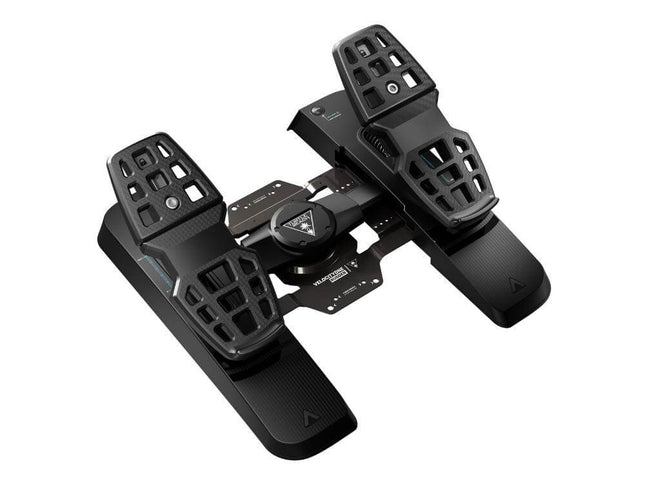
Turtle Beach VelocityOne Rudder
€ 194,93
-
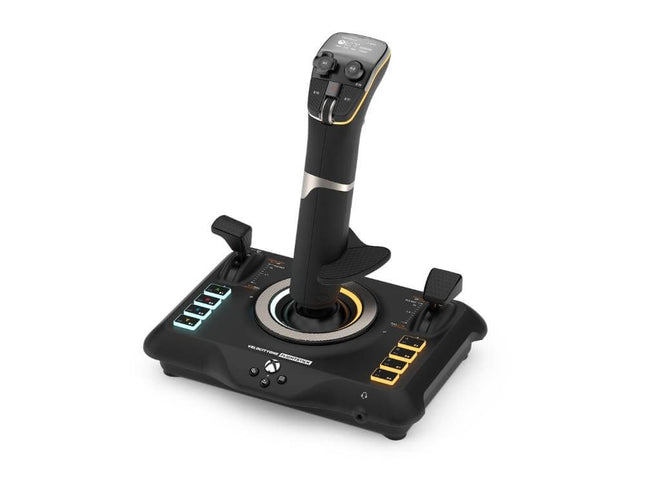
Turtle Beach VelocityOne Flightstick
€ 97,88
-
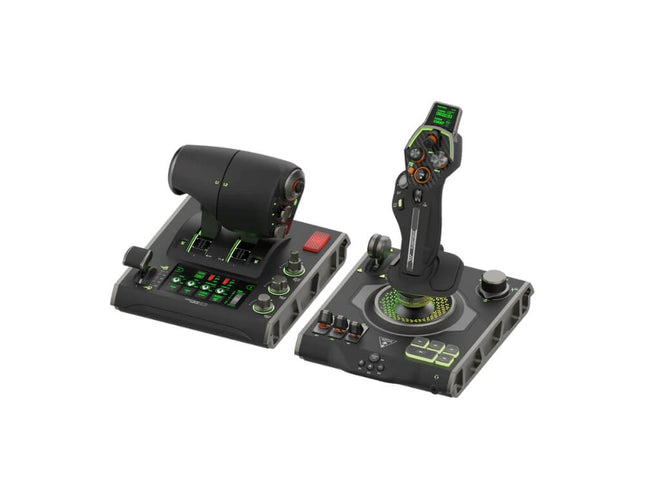
Turtle Beach VelocityOne Flightdeck
€ 331,13
-

Turtle Beach VelocityOne HOTAS
€ 169,40
-

Turtle Beach VelocityOne Sim Mount
€ 46,81
-

Turtle Beach VelocityOne Dual Throttle
€ 101,30
-

Turtle Beach VelocityOne Flightstick II
€ 101,30
-

Turtle Beach Turtle Beach - VelocityOne Flight Deck Bundle
€ 543,94
-

Turtle Beach Turtle Beach - VelocityOne Flight Bundle
€ 526,92


Frequently Asked Questions about Turtle Beach hardware
Are Turtle Beach VelocityOne products compatible with Microsoft Flight Simulator 2020 and 2024?
Yes. Turtle Beach VelocityOne flight controls are compatible with Microsoft Flight Simulator 2020 and Microsoft Flight Simulator 2024.
However, compatibility depends on the specific product, platform and configuration, so always check the supported simulators before choosing your flight controls.
Can I use Turtle Beach VelocityOne flight controls on Xbox Series X|S?
Yes. Selected VelocityOne flight controls are designed for Xbox Series X|S as well as Windows PC. Make sure you choose the Xbox-compatible version, as some VelocityOne products are PC-only, while others support both PC and Xbox.
Flight controls are not supported through Xbox Cloud Gaming, so the simulator needs to be installed locally on the console.
Can I use Turtle Beach VelocityOne Rudder Pedals directly with Xbox?
No. The VelocityOne Rudder Pedals cannot be connected directly to an Xbox console as a standalone controller. On Xbox, they need to connect through a compatible VelocityOne flight controller, such as the VelocityOne Flight Universal Control System or a compatible VelocityOne Flightstick, using a pass-through connection. On Windows PC, the rudder pedals can be connected directly via USB.
What is the difference between VelocityOne Flightstick and Flightstick II?
The VelocityOne Flightstick II is the newer and more advanced generation. The original Flightstick offers 27 programmable buttons, non-contact main axes, integrated throttle controls, and an OLED Flight Management Display. Flightstick II increases this to 38 programmable inputs and 8 axes, adds high-resolution 16-bit Hall-effect sensors, adjustable stick tension, haptic feedback, RGB lighting, and a more advanced full-color Flight Management Display. It is also designed to expand more easily with additional VelocityOne controls, including a separate throttle and rudder pedals.
Can I use Turtle Beach VelocityOne hardware for both civil and military flight simulation?
Yes. The VelocityOne range includes controls suitable for both civil and military flight simulation. Yoke-based controls are particularly suited to general aviation and commercial aircraft, while flightsticks and HOTAS systems provide a more natural control layout for military jets and other stick-controlled aircraft. Choose your hardware based on the aircraft you fly most often.
Do Turtle Beach VelocityOne products require additional software or drivers?
This depends on the product. Many VelocityOne controls can be used directly with supported simulators, while the VelocityOne Hangar app can be used to update firmware and configure compatible hardware. Some advanced features (such as the Status Indicator Panel on the VelocityOne Flight, or the Touch Display on the VelocityOne FlightDeck) require additional Windows software or drivers. Always check the requirements of the individual product.